


Email Warm-Up tools have become essential for anyone sending cold email campaigns, running outreach programs, or managing business email accounts. Whether you’re a sales team trying to reach prospects, a recruiter hunting for talent, or a marketer launching campaigns, your success depends on one critical factor: inbox placement. If your emails land in the spam folder, your carefully crafted messages will never get read.
Here’s the uncomfortable truth most guides won’t tell you: building a strong sender reputation doesn’t happen overnight. New email domains and fresh accounts start with zero trust from email providers like Gmail, Outlook, and Yahoo. When you suddenly send hundreds of emails from a brand-new domain, spam filters flag you as suspicious. That’s where email warm-up services come in; they help you build credibility gradually so your emails actually reach the primary inbox.
In this guide, you’ll discover the six best email warm-up tools available today, learn exactly how to warm up email domain settings before launching campaigns, and understand practical strategies to improve your email deliverability. Let’s dive in.
Disclaimer: I strongly believe in transparency. If you buy using the links on our site, we may earn a small commission without any extra cost to you. This helps me to keep producing honest reviews. Read More >>
Table of Contents
ToggleWhat Is Email Warm-Up and Why Does It Matter?
If you’ve ever wondered “what is email warm-up,” you’re not alone. Many marketers hear the term but don’t fully understand why it’s crucial for successful outreach.
Email warm-up is the process of gradually building trust with email service providers (ESPs) by simulating natural email activity. When you warm up email domain settings, you send and receive emails at a controlled pace, generating positive engagement signals like opens, replies, and “mark as important” actions. This tells email providers that you’re a legitimate sender, not a spammer.
The concept behind warming email addresses is straightforward: real humans don’t suddenly start sending thousands of emails on day one. They build relationships gradually, sending a few emails, receiving replies, and increasing volume over time. Email warm-up tools automate this process, helping your new domain or inbox mimic this natural behavior pattern.
Without proper warm-up, your cold email campaigns face serious risks. Your sender reputation stays low, spam filters mark your messages, and your emails end up in the spam folder instead of the primary inbox. This means lower open rates, fewer replies, and wasted effort on campaigns that never reach their intended recipients.
How to Warm Up an Email Domain Before Your Campaign
Before you launch any cold email outreach, you need a proper warm-up strategy. Here’s how to warm up email domain settings effectively:
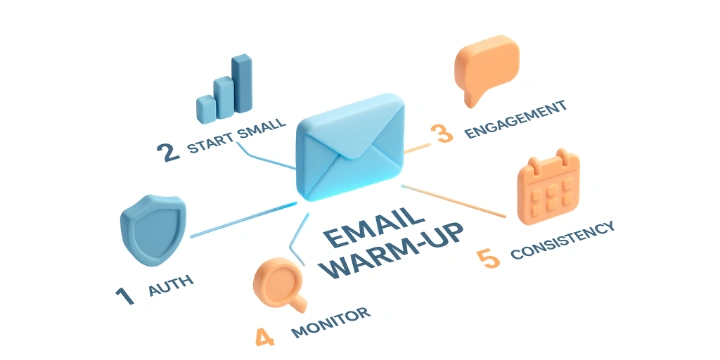
Step 1: Set Up Authentication First
Authentication is your foundation. Before warming up, configure your SPF (Sender Policy Framework), DKIM (DomainKeys Identified Mail), and DMARC (Domain-based Message Authentication, Reporting & Conformance) records. These protocols prove to email providers that your domain is legitimate and authorized to send emails.
Step 2: Start Small and Gradual
Begin with just 3-10 emails per day during the first week. Increase volume slowly; never double your sending overnight. A gradual ramp-up looks natural to spam filters and builds trust more effectively than aggressive approaches.
Step 3: Generate Positive Engagement
Your warm-up emails need to receive responses. When recipients open, reply, and engage with your messages, it signals to email providers that your domain deserves inbox placement. This is why many email warm-up services use networks of real inboxes to generate authentic engagement.
Step 4: Monitor Your Progress
Track your inbox placement using tools like Google Postmaster Tools for Gmail or SNDS (Smart Network Data Services) for Microsoft. Watch your sender reputation score and adjust your warm-up pace accordingly.
Step 5: Maintain Consistently
How long to warm up an email domain before campaign efforts? Most experts recommend a minimum of 14-21 days for new domains. Even after launching your campaign, continue warming to maintain your reputation. Consistency is key to long-term deliverability.
The good news? With the right email warm-up tool and a solid strategy, you can build a strong sender reputation within two to three weeks and significantly improve inbox placement.
6 Best Email Warm-Up Tools
After testing and analyzing the leading solutions, here are the six best email warm-up tools that genuinely help you improve deliverability:The good news? With the right email warm-up tool and a solid strategy, you can build a strong sender reputation within two to three weeks and significantly improve inbox placement.
| Feature | Warmy | MailReach | Warmup Inbox | Folderly | TrulyInbox | Warmbox |
|---|---|---|---|---|---|---|
| Network Size | Large | Large | 30000+ real | Large | 40000+ | 35000+ |
| AI-Powered | ✔ | ✔ | ✔ | ✔ | ✔ | ✔ |
| Free Trial | 7 Days | Limeted | 7 Days | Demo | Free Plan | Available |
| Starting Price | 49$ | 25$ | 19$ | 49$ | 29$ | 19$ |
| Inbox Placement | High | High | 98% | Very High | 95% | Very High |
| Multi-Account | ✔ | ✔ | ✔ | ✔ | Unlimited | ✔ |
| Blacklist Monitoring | ✔ | ✔ | ✔ | ✔ | ✔ | ✔ |
Warmy
Warmy stands out with its cutting-edge AI technology designed to maximize email deliverability. This comprehensive platform goes beyond simple warm-up by offering a complete deliverability ecosystem.
Key Features:
- AI-driven warm-up automation that adapts to your sending patterns
- Email verification to ensure your list stays clean
- Seed list functionality for accurate inbox placement testing
- Google Postmaster integration for real-time reputation monitoring
- Deliverability insights dashboard showing inbox, spam, and promotions tab placement
Warmy Pricing:
- 7-day free trial available
- Starts at $49/month for 1 inbox and 100 warm-up emails/day
- Enterprise plans available for agencies
Why Choose Warmy?
With over 650,000 domains improved and 35,000+ businesses using the platform, Warmy has proven results. Their AI technology analyzes your email behavior and optimizes warm-up patterns automatically. The platform claims up to 2.3x higher open rates and 3x higher click rates after proper warm-up.
MailReach
MailReach positions itself as a focused deliverability tool rather than an all-in-one platform. This specialization means their email warm-up service is refined and highly effective for cold email campaigns.

Key Features:
- Advanced email warm-up with high-reputation account network
- Spam checker to test your emails before sending
- Email verifier for clean, valid address lists
- Co-pilot feature providing actionable deliverability insights
- Works with any SMTP-compatible email service provider
MailReach Pricing:
- Free spam test available
- Plans starting at $25/month
- Volume-based pricing for larger teams
Why Choose MailReach?
MailReach customers report impressive results: 137% average reply rate growth and 19% average revenue growth from email. The platform is particularly popular among B2B sales teams, lead generation agencies, and recruitment firms. Their focus on deliverability (rather than spreading efforts across many features) means your warm-up is optimized for actual inbox placement.
One unique advantage: MailReach’s warm-up includes multi-layered conversations rather than single-send interactions, mimicking true human email behavior more effectively than competitors.
Warm-up Inbox
Warm-up Inbox differentiates itself with one compelling statistic: their users achieve 98% primary inbox placement, compared to an 83% average for other warm-up tools. This difference comes from their network of 30,000+ real human inboxes.
Key Features:
- Real inboxes (not bots or fake mailboxes)
- Automatic opens, replies, and “mark as important” interactions
- 90-day deliverability history with ESP-level breakdowns
- Blacklist monitoring with automatic rescue operations
- Works with Gmail, Outlook, Yahoo, Zoho, and custom SMTP
Warm-up Inbox Pricing:
- 7-day free trial
- Plans starting at $19/month per inbox
- Agency pricing available for managing multiple accounts
Why Choose Warm-up Inbox?
Their internal benchmarks show you can reach 90% primary placement by day 14 twice as fast as other tools. The network quality is exceptional: all interactions come from real humans on the same providers your prospects use. If a blacklist issue occurs, Warm-up Inbox automatically initiates rescue operations to get you delisted within 36 hours.
The platform is trusted by sales teams, SDR organizations, agencies, and marketers who need reliable deliverability for high-volume campaigns.
Folderly
Folderly takes a holistic approach to email deliverability. Rather than focusing solely on warm-up, they provide a complete ecosystem that diagnoses issues, fixes root causes, and monitors performance continuously.
Key Features:
- Inbox Insights for pre-campaign analysis
- AI-powered optimization recommendations
- Real-time alerts when emails land in spam
- DNS record analysis and fixes
- Multi-ESP support via API and SMTP integration
Folderly Pricing:
- Free trial: 60 monthly credits, no credit card required
- Plans from $49–$1,499/mo based on volume (150–5,000+ credits), 20% off annually
- Agency & enterprise tiers with custom onboarding and dedicated support
Why Choose Folderly?
Folderly’s clients achieve remarkable results. The platform uses cause-and-effect analysis to identify exactly why your emails end up in spam and provides actionable plans to fix issues permanently.
With SOC 2 and ISO27001 certifications, Folderly is ideal for enterprises requiring certified compliance and enterprise-grade security. Their approach addresses the complete email deliverability challenge, not just the warm-up component.
TrulyInbox
TrulyInbox combines AI-generated warm-up content with sophisticated deliverability intelligence. Their platform creates warm-up emails that match your industry and outreach style, making the warm-up process virtually indistinguishable from real campaigns.
Key Features:
- AI-generated warm-up content for 50+ industries
- 12 language support for global outreach
- 3 warm-up strategies: Progressive, Random, and Flat
- Deliverability Score (0-100) for each account
- Outreach Readiness indicator showing when to start sending
- Unlimited account connections on paid plans
TrulyInbox Pricing:
- Free plan available (1 account, 10 daily warm-up emails)
- Starter: $$29/month (200 daily warm-up emails, up to 3 inboxes)
- Growth: $99/month (1,000 daily warm-up emails, up to 15 inboxes)
- Scale: $199/month (3,000 daily warm-up emails, up to 50 inboxes)
Why Choose TrulyInbox?
The platform offers 95%+ average inbox placement, with most users seeing improvement within 2-3 weeks. Their AI doesn’t just send generic warm-up emails; it generates contextual content that mirrors your actual outreach, building a more authentic sender reputation.
The Outreach Readiness indicator tells you exactly when your account is prepared for real campaigns, eliminating guesswork. With unlimited account connections on all paid plans, agencies managing multiple clients pay a flat rate rather than per-inbox fees.
Warmbox
Warmbox provides an AI-based warm-up solution with a focus on ease of use and effectiveness. Their network includes over 35,000 private inboxes, making it one of the largest warm-up networks available.
Key Features:
- GPT-4 and hybrid AI for human-realistic interactions
- Multiple warm-up strategies: Growth, Flat, or Random
- Auto-remove from spam functionality
- Auto-reply and mark-as-favorite features
- Comprehensive dashboard with detailed analytics
- Multi-account management for agencies
Warmbox Pricing:
- Free tools & demo available, no credit card required to test deliverability
- Plans from $19–$159/mo based on warm-up volume (1–6 inboxes, 50–500 emails/day)
- Agency-ready: team members on every plan, multi-account support, custom Team tier
Why Choose Warmbox?
Warmbox combines sophisticated AI technology with an intuitive interface. Users report deliverability improvements of 70% or more within weeks. The platform supports all major email providers, including Gmail, Outlook, Yahoo, iCloud, SendGrid, Mailgun, Amazon SES, and any SMTP-based service.
The automated interactions of opening emails, marking them as favorites, and replying to messages create authentic engagement signals that email providers recognize as legitimate activity. With plug-and-play setup, you can connect your inbox in under two minutes without technical expertise.
How to Improve Deliverability: Beyond Warm-Up
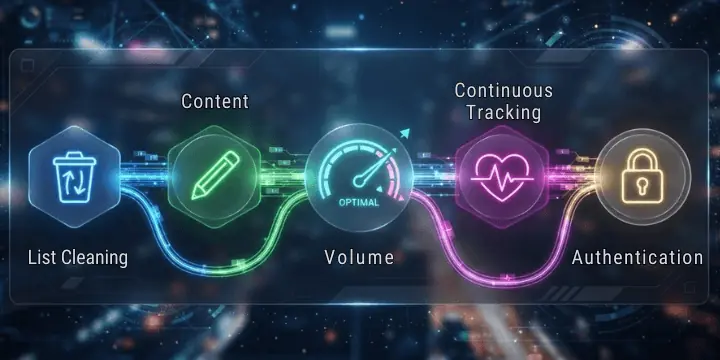
While email warm-up tools are essential, true deliverability success requires attention to multiple factors. Here’s how to improve inbox placement comprehensively:
Maintain List Quality
Your email list quality directly impacts deliverability. Use email verification services to remove invalid addresses before sending. High bounce rates damage your sender reputation faster than warm-up can rebuild it. Regularly clean your list and remove subscribers who haven’t engaged in 6-12 months.
Optimize Email Content
Even with perfect warm-up, spam content triggers filters. Avoid excessive punctuation, ALL CAPS, and spammy phrases like “FREE” or “ACT NOW.” Personalize your email templates and ensure your content provides genuine value to recipients.
Manage Email Volume Carefully
Sudden spikes in volume signal spam to providers. Spread your campaigns across multiple days and vary your sending times. Use inbox rotation to distribute volume across multiple email accounts, reducing the risk of any single inbox getting flagged.
Monitor Deliverability Continuously
Don’t set up warm-up and forget it. Regularly check your inbox placement, monitor blacklists, and watch for warning signs like increasing bounce rates or declining open rates. Early detection of problems prevents major deliverability disasters.
Authenticate Everything
Ensure SPF, DKIM, and DMARC are properly configured for every sending domain. Authentication failures are one of the most common causes of poor deliverability, and they’re entirely preventable with correct setup.
Frequently Asked Questions
How long does email warm-up take to show results?
Most users see initial improvements within 3-7 days, with significant results appearing after 14-21 days. Full inbox placement typically stabilizes within 30 days of consistent warm-up. The exact timeline depends on your starting reputation, sending volume, and email provider.
Can I send cold email campaigns while warming up?
Yes, but proceed cautiously. Keep your campaign volume low (under 20-50 emails daily) during the first few weeks while your warm-up tool handles the majority of activity. Let your warm-up establish a strong reputation baseline before scaling your outreach.
Is email warm-up necessary for established accounts?
Even established accounts benefit from ongoing warm-up. Your sender reputation can degrade over time, especially if you experience bounces, complaints, or sudden volume changes. Regular warm-up maintains your standing and prevents deliverability issues.
What happens if I stop warming up?
Your sender reputation gradually decreases without ongoing positive engagement. Most experts recommend maintaining warm-up alongside campaigns to preserve your inbox placement. Think of it as ongoing maintenance rather than a one-time fix.
Do warm-up tools work with all email providers?
Quality warm-up services support major providers including Gmail, Google Workspace, Outlook, Office 365, Yahoo, Zoho, and any SMTP-based service. Before choosing a tool, verify it supports your specific email infrastructure.
Ready to Transform Your Email Deliverability?
Your email campaigns deserve better than the spam folder. Whether you’re launching a new domain, recovering from deliverability issues, or scaling your outreach efforts, the right email warm-up tool makes all the difference.
Start your free trial today with any of the tools above. Test their features, monitor your results, and discover how proper warm-up transforms your inbox placement. Within weeks, you could see your open rates multiply, and your reply rates climb.


